
Appearance
Partner API Documentation v1.0
Introduction
We're excited to announce the finalization of the first version of our Partner API! As we continue developing more features for our partners, this document serves to formally present and document this new functionality.
Primary Features
This API is designed to streamline your customer onboarding process by allowing you to easily manage accounts and securely fetch credentials.
The core functionalities provided in this version are:
- Account Creation: Programmatically create new accounts on our system for your clients.
- Flexible Approval Notification: Receive a secure notification once an account has been approved internally.
- Secure Credential Fetching: Use a one-time token to instantly retrieve the necessary API keys and secrets for your client.
Contact and Access
For any questions, support, or to request access to the Partner API on any environment (Integration or Production), please use the dedicated contact information below.
| Detail | Value |
|---|---|
| Primary Contact | partners@aplyid.com |
| Purpose | Access requests, integration questions, and partnership-related support. |
| Secondary Contact | support@aplyid.com |
| Purpose | APLYiD core product support, account questions, and non-partner related questions |
Account Creation Workflow
We have implemented a simple yet secure, two-step sequence for account creation and credential retrieval:
Step 1: Account Request & Notification Setup
You send us a request containing your client's company name and a dedicated Notification URL. We will use this URL to inform you once the account has been approved internally.
Step 2: Approval and Credential Fetch
- Once internal paperwork is complete, we will send an Approval Notification to your provided URL. This notification will contain:
- A One-Time Token.
- The Credential Request URL.
- You submit the token to the Credential Request URL.
- Our system validates the token and responds with your client's unique API Key and API Secret for you to set up in your system.
Detailed Sequence & Technical Notes
Notes on Approval Notification Handling
The approval notification sent to your designated Notification URL is critical for completing the account setup. Please be aware of the following operational and implementation details:
Worker Retries and Success
- The approval notification will be dispatched by one of our background workers.
- This worker will retry sending the notification until it receives a successful HTTP response status code (e.g.,
200 OK,204 No Content) from your server.
Token and Credential Fetching Strategy
You have two main implementation options for handling the received notification:
- Immediate Fetch (Synchronous): Fetch the credentials instantly within the context of the notification request.
- Delayed Fetch (Asynchronous/Recommended): Save the one-time token and URL, then immediately send a successful response back to our worker. A separate, decoupled process (like a job queue) should then handle the credential fetching.
⚠️ Critical Implementation Warning (Timeouts)
If you choose the Immediate Fetch strategy:
- Do not exceed a 30-second execution time. Our system will timeout any request exceeding this limit.
- A timeout will cause our worker to treat the attempt as a failure and retry the notification, which may lead to redundant or conflicting operations on your system.
Finality of the Notification
- Once our worker receives a successful response from your Notification URL, it will assume the token has been handled correctly.
- There will be no further attempts to send the notification, and the one-time token will not be retrievable through any other means.
- We strongly recommend being mindful around edge cases and error handling on your side to prevent the token from being lost or mishandled, avoiding this kind of dead-end scenario.
Detailed sequence
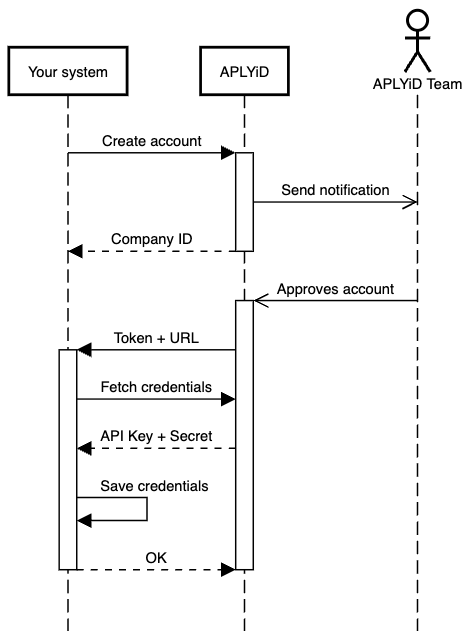
Pre-requisites and Authentication
Partner Account Setup
To begin development, please ensure you have a partner account setup:
- Action: Send us an email at partners@aplyid.com to initiate the partner account generation process.
- Credentials: Once complete, we will communicate your Integration Environment API Keys for you to begin development and testing.
Authentication
The Partner API utilizes the same authentication model as our v4 API:
- Model: Key-based authentication is handled identically to the v4 API. For a full understanding of the process, please consult: V4 Authentication.
- Signature: Signature calculation and validation is not mandatory and is left to your discretion.
API Endpoint Reference
This section provides the technical details for the three core operations: creating an account, handling the approval notification, and fetching the credentials.
1. Creating an Account
This endpoint initiates the account creation process on our system.
| Detail | Description |
|---|---|
| URL | POST /api/v4/companies |
| Authentication | Aply-API-Key header (Your Partner API Key) |
Request Body
| Parameter | Type | Required | Description |
|---|---|---|---|
company | object | Yes | Container for company details. |
company.name | string | Yes | The legal name of your client's company. |
company.trading_name | string | No | The trading or brand name of your client's company. Defaults to company.name if omitted. |
notification | object | Yes | Webhook configuration for approval notification. |
notification.url | string | Yes | Your webhook endpoint URL. Must be HTTPS. |
notification.headers | object | No | Key/value pairs of custom headers for us to include in the notification request. |
Example Request:
json
{
  "company": {
    "name": "Test Company",
    "trading_name": "Test Trading Name"
  },
  "notification": {
    "url": "https://your-system.com/28c1da32-5c75-482f-ba7d-3ace70b979a5",
    "headers": {
      "Authorization": "Bearer a-bearer-token"
    }
  }
}
Successful Response
- Status:
201 Created - Action: We recommend you save the returned
company_idin your system for future reference.
Example Response:
json
{
  "company_id": 1234
}
2. Company Approval Notification (Webhook)
This is the request our background worker sends to the notification.url you provided once the account is approved by our support team.
| Detail | Description |
|---|---|
| URL | POST {provided_url} (The URL you configured in the creation request) |
| Authentication | Includes any custom headers you provided (e.g., Authorization). |
| Notes | Your system must return a successful HTTP status code (2xx) to prevent the notification from being retried. |
Request Headers
| Header | Example Value | Notes |
|---|---|---|
Authorization | Bearer a-bearer-token | Your custom headers provided during account creation will be included here. |
Request Body
| Parameter | Type | Description |
|---|---|---|
event | string | The event name (always "company_approved"). |
company_id | integer | The ID of your newly created account. |
credentials | object | Container for credential retrieval details. |
credentials.url | string | The exact URL to use for fetching the final API keys. |
credentials.ott | string | The One-Time Token (OTT) required to authenticate the credential fetch request. |
Example Request Body:
json
{
  "event": "company_approved",
  "company_id": 1234,
  "credentials": {
    "url": "https://integration.aplyid.com/api/v4/companies/1234/credentials",
    "ott": "TXgy4PfmpwA6tKBaxdN4sdAg"
  }
}
3. Fetching the Created Account Credentials
This endpoint is the final step, used to exchange the one-time token for the permanent API keys.
| Detail | Description |
|---|---|
| URL | PUT /api/v4/companies/{company_id}/credentials (Use the URL received in the notification) |
| HTTP Method | PUT |
| Request Body | None |
| Notes | The OTT is invalidated immediately upon a successful response. Ensure robust error handling before responding to our worker. |
Required Headers
The one-time token (ott) received in the notification is used in the Authorization header.
| Header | Value Structure | Description |
|---|---|---|
Aply-API-Key | (Your Partner API Key) | Used for identifying the partner making the request. |
Authorization | Token {ott} | The One-Time Token prefixed with Token and a space. |
Successful Response
The response contains the permanent API credentials for the new client account.
Example Response:
json
{
  "api_key": "kCCCYzBZbcJL8S6Ln6MQKPSS",
  "api_secret": "UrrGaEV1w6JPd6aeYboPkM7SNuLVyVnR"
}
Action: These credentials should be stored securely in your system for your client to begin using our services. The one-time token is now invalid.